

Data warehouse graphic

Your Financial Models Are Now AI-Native

ClearFactr’s MCP Server makes every model a first-class tool in the agentic AI ecosystem. AI agents discover, query, stress-test, and explain your models through natural conversation.

Build once. Query forever.
Through conversation.

ClearFactr has been unabashedly deterministic at the modeling layer from day one. Every formula produces the same result every time. Every model is self-documenting. Every computation is stateless and conflict-free.

Now, with the Model Context Protocol (MCP), that deterministic power becomes conversational. An AI agent can build a model from scratch, run unlimited what-if scenarios without saving anything, and explain how every formula works — all through natural language. The model doesn’t change. It doesn’t need annotations. It’s already an API.

This isn’t an AI add-on bolted onto a spreadsheet. ClearFactr’s architecture — stateless computation, self-documenting formulas, conflict-free concurrent access — was built years before MCP existed. The agentic era arrived and ClearFactr was already ready.

Build Models Through Conversation

An AI agent constructs a real financial model from scratch via MCP — no manual spreadsheet work. Multiple tabs, clean structure, formulas that reference inputs, time-aware columns. The agent uses ClearFactr’s tools to create plans, add tabs, populate rows, and set formulas, all through natural language instructions.

Your subject matter expert describes the model they need. The agent builds it. The model is immediately governed, versioned, API-accessible, and self-documenting — from its first moment of existence.

Explore Scenarios Without Touching the Model

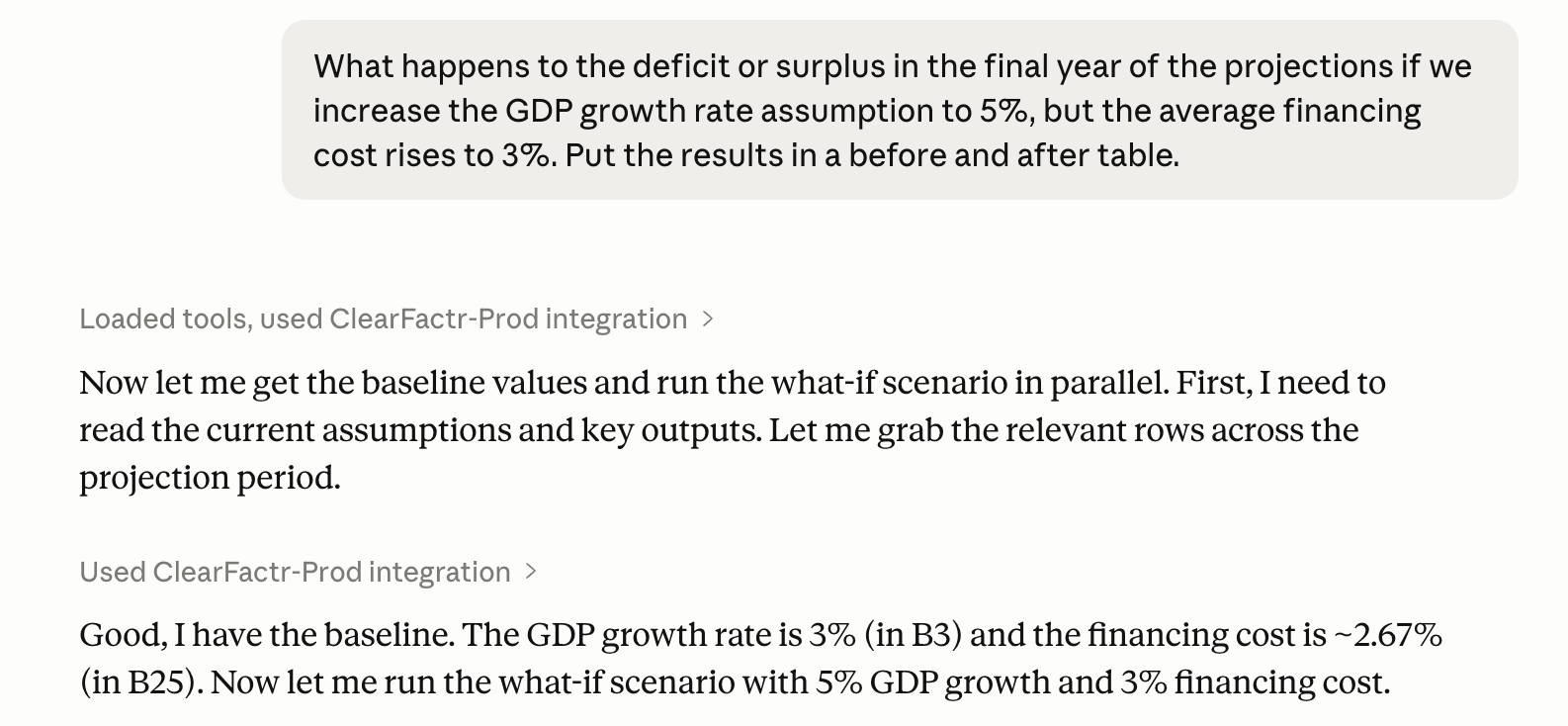
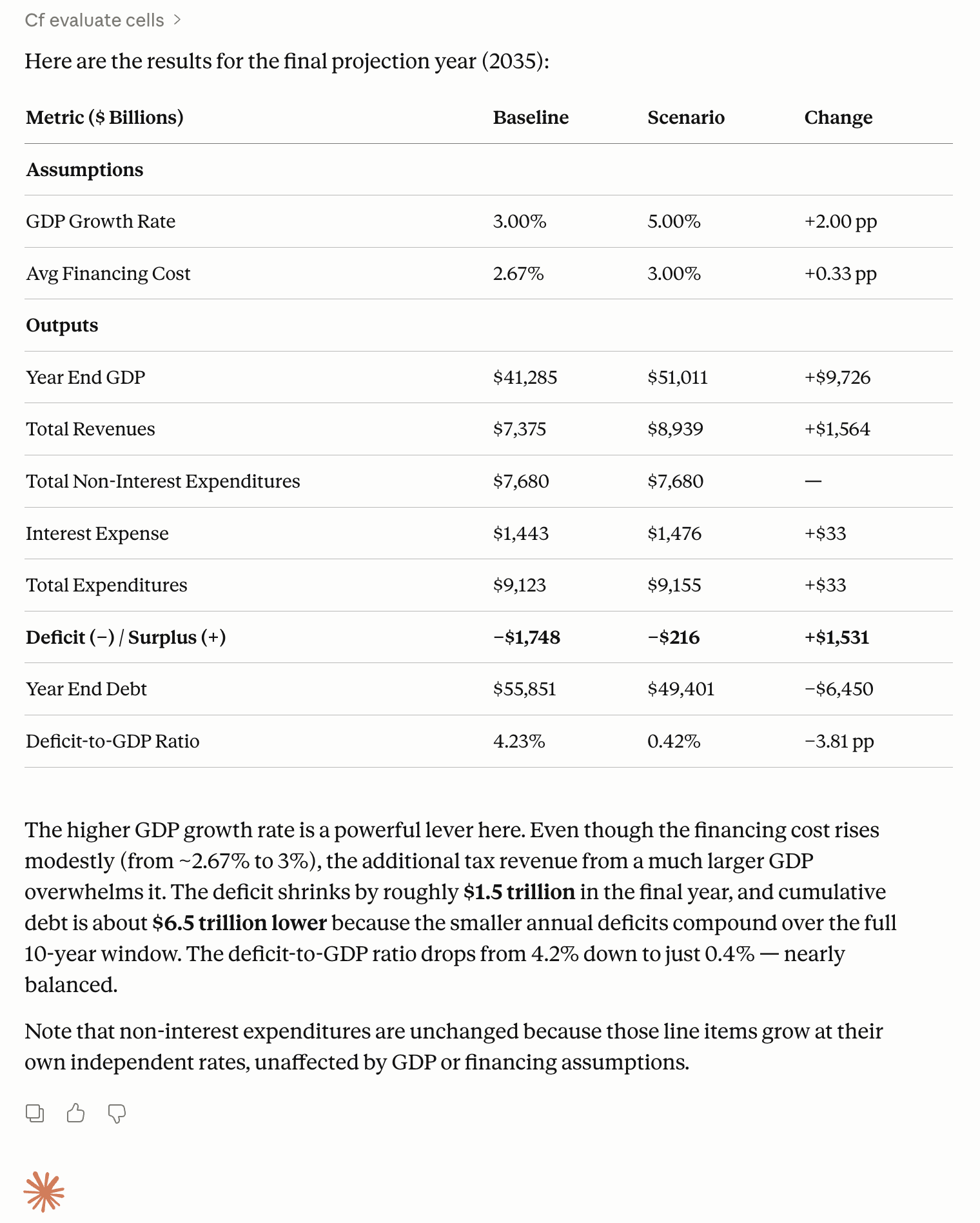
Without saving anything, a user has a natural conversation: “What if we raise prices 20% but lose 15% of our customers?” The agent translates that into input overrides, computes against the model, gets back deterministic results, and interprets them in plain English. Then another question, and another — each one a fresh what-if against the same unchanged model.

The model is acting as a stateless computation engine. Nothing is saved. Nothing is modified. Multiple agents or users can query the same model simultaneously with zero conflicts. This is the same architecture that powers the Server-Side API — now accessible through natural language.

Understand Any Model Instantly

Ask “How is EBITDA calculated?” or “Walk me through how net profit flows.” The agent pulls the formulas back and explains the logic in plain English. No annotations were needed. No metadata layer. No prompt engineering on the model itself.

This works because of ClearFactr’s patented natural-language formula rendering. Every formula is deterministically translated into human-readable language using your own row and column names. The AI agent doesn’t guess what a formula does — ClearFactr tells it. The model is self-describing.

Governed power,
delivered through conversation.

The MCP Server exposes ClearFactr’s full platform capabilities as tools an AI agent can invoke. Here’s what an agent can do:

ClearFactrGlyph-104x104

Build &
Structure

Create Models from Scratch

Create plans, add tabs, define rows, set formulas, configure time periods and scenarios. An agent can build a fully-structured financial model through conversation — complete with cross-tab references, named inputs, and time-aware columns. 

ClearFactrGlyph-104x104

Read & 
Navigate

Explore Any Model’s Structure

List plans, tabs, rows, scenarios, and cell values. The agent can navigate the full model structure, find the data it needs, and understand how tabs connect to each other — all without the user needing to point it at a specific cell.

ClearFactrGlyph-104x104

Understand &
Explain

Read Formulas In Plain English

 Retrieve any cell’s formula rendered in natural language. Instead of =B3*(1+$A$7), the agent sees “Revenue × (1 + Growth Rate).” It can explain model logic to stakeholders, audit formula chains, or answer questions about how any result is calculated. 

ClearFactrGlyph-104x104

Write & 
Update

Modify Models Programmatically

Update input values, add new rows, adjust formulas, or restructure tabs. The agent can evolve the model as requirements change. Every modification is versioned, audited, and immediately reflected in all downstream API calls and agentic workflows.

ClearFactrGlyph-104x104

Compute & Analyze

Run What-If Scenarios in Memory

Override any input values and compute results — without saving anything. Run multi-variate sensitivity analysis, parameter sweeps, or stress tests. The model acts as a pure, stateless function: inputs in, results back, nothing changed.

ClearFactrGlyph-104x104

Scenario
Management

Switch and Compare Scenarios

List available scenarios, switch between them, and compare results across Base, Upside, Downside, or any custom scenario — all against the same compact model. No copies. No duplicated tabs. The agent works across scenarios as naturally as it works across cells.
Screenshot 2026-04-20 at 2.43.29 PM

Just Build Your Model. It’s Already an API.

The model is built once, never duplicated, never annotated, and it serves as a living computational API that an agent can query, stress-test, and explain — all through conversation.

That’s a fundamentally different relationship with a spreadsheet than anything Excel offers. And it doesn’t require the model builder to do anything special to enable it. Just build your model. It’s already an API.

Your end users benefit too — they get answers faster, through natural conversation, backed by the same governed, deterministic models your risk team has already approved.

Up and Running in Minutes

It's remarkably trivial. The ClearFactr MCP Server works with any MCP-compatible AI client — Claude Desktop, Cursor, your own custom agent, or any tool that speaks the Model Context Protocol. Connect it to your ClearFactr account, point it at a model, and start asking questions.

No SDK to install. No code to write. No model annotations to maintain.

If you have a ClearFactr model, you already have an AI-ready computation engine.


Contact Us to Get Started

Screenshot 2026-04-20 at 2.43.46 PM