
The ClearFactr API is your gateway to building solutions to problems in ways never before possible. It has all the features you’ll need to interact with your models in ways limited only by your imagination. The ClearFactr team wants to help ensure that you not only “get it working”, but that you “get it right.” A bit of strategizing around how to best use the API for different types of situations — and figuring out which one most closely matches your own — will help guarantee your solution will perform at its best, and endure.
QUICK TIP
If you're simply looking for the endpoints to the API, they're here. The purpose of this document is to help decide which endpoints to call, when, and why.
A ClearFactr model is often referred to as a "plan" because they are often time-based. Understanding a few basic concepts and idioms will help you to make the most of the API:
A ClearFactr model/plan is logically broken down into a number of important components. Understanding how these work with each other can aide in your own solution's architecture. The components include:
QUICK TIP
The latter "key" has the nice benefit of not needing to know or care what the physical location of the cell is and, depending on your program design, can yield a solution that is more resilient to changes in the physical layout of the model.
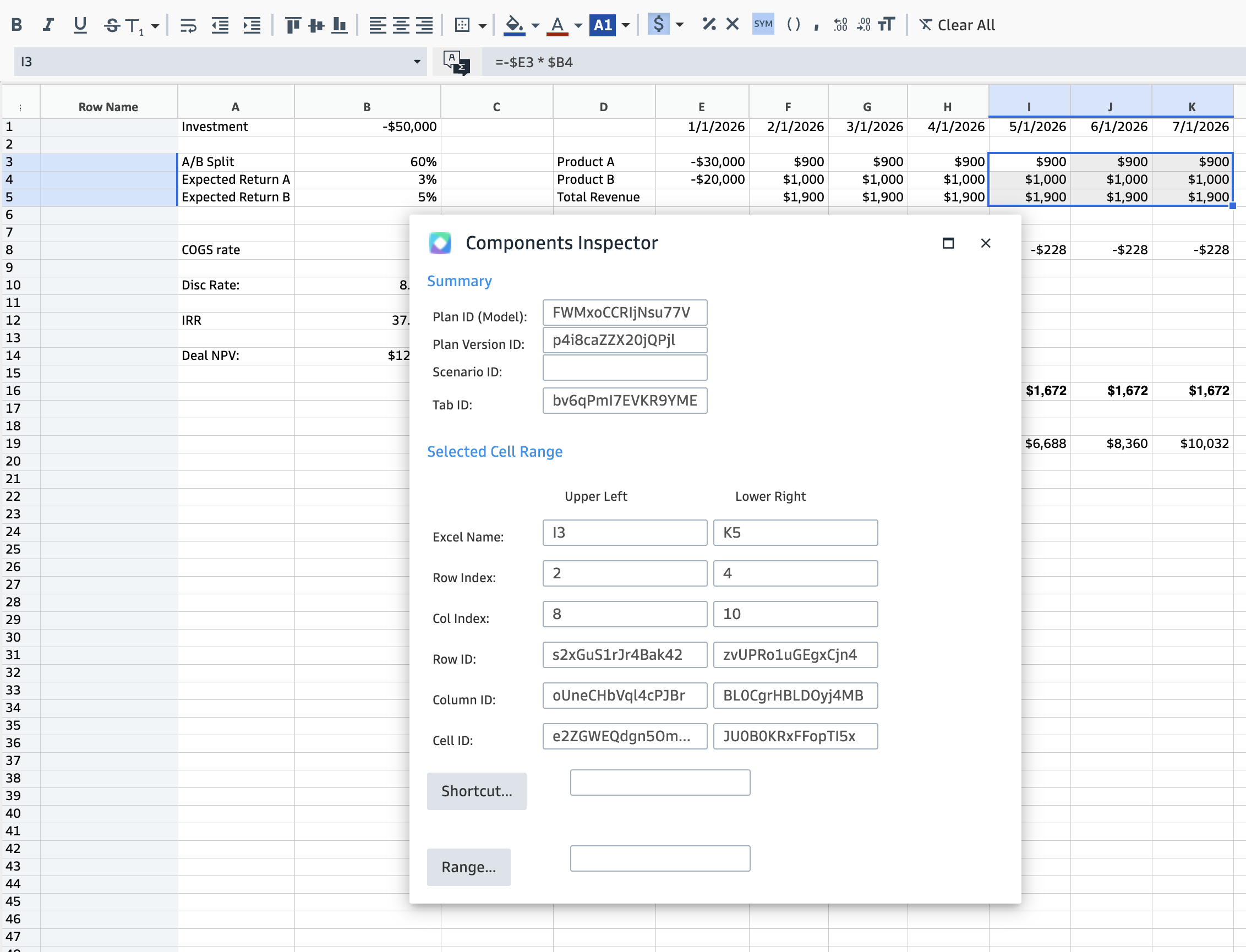
The Components Inspector can greatly facilitate working with any particular model. Simply right-click on a any cell and select "Components Inspector" from the context menu.
Any GUID you might need for a model, sheet, cell, or range of cells, to be used by any given API endpoint, can be obtained via this interactive tool. Note that if you select a single cell, only the Upper Left fields will be filled in. In the example above, the selection was from I3:K5. The Inspector isn't modal, therefore, you can change the selection in the background with the mouse or keyboard and the Inspector will update itself automatically.
Every API-based solution will start with a call to the apiLogin endpoint to obtain an accessToken, which in turn is required by every other endpoint. Access Tokens expire in 60 minutes, and the endpoint will return the time at which the token expires. Therefore, best practices are:
Regardless of your use-case, you'll want to make some conscious decisions up front about how you'll work with your model or models. In some cases, you might have the luxury of being able to influence or control the design of the models themselves. In other cases, the design of the model might already be determined, and you'll need to "work with what you have." The rest of this section will present some issues for your consideration.
If you know precisely which model or models you'll be working with, you can utilize their pre-existing planIDs that you can query ahead of time and preserve in a safe location. Otherwise, you can use the getUserPlanInfo endpoint to return back a collection of metadata for models that you have access to. That endpoint can also filter by model name. Iterate over the collection to determine the model or models you need to work with. Keep in mind that once you have a planID, you can rely on that GUID to identify your particular model, even if the owner or co-author of the model changes its name later on. This brings us directly to the next topic...
The most important issue to consider when you begin to use design your solution around ClearFactr's API is whether or not your models are structurally stable, and to what extent. Keep in mind there can be a "continuum of stability": Beginning with any given sheet, the most structurally stable sheet can be counted on having the same number of rows and columns each time you work with it. Depending on how the owner or co-author of the model is working with the model, they might add or remove rows and/or columns. Likewise, the entire model may have a "stable" or "unstable" number of sheets. Or, the number of sheets might stay the same, but they might get renamed from time to time (likewise for names and/or column names!).
If the property or dimension of the ClearFactr model you're working with is stable – and therefore, trustworthy – you can optimize a solution that leverages the GUIDs of the associated property. Conversely, if you want or need to remain very dynamic, your solution can start with a call to the getMinimalPlanDefinition endpoint. This will return all of the structural information about the model, but none of the evaluated content. Then you can interrogate the resulting information for basic info such as the number of sheets, the structure of any given sheet, and properties thereof, such as the sheet's name, the columns, the column names, etc.
Keep in mind that somewhere in your design, you'll need to have some kind of anchoring mechanism and/or assumption. If you want to treat the fourth column of the second tab in a certain way, your anchor is the assumption that no tabs will be inserted to the left of that tab, and that no columns will be inserted prior to column four. That might be fine.
Conversely, you might want to anchor around a certain tab name, and find its location dynamically based on the names returned by getMinimalPlanDefinition. Then you might want to rely on certain column names – keeping in mind you can rename the legacy "A", "B", "C" column names to potentially more meaningful things. Or, you might want to designate a certain row to hold important information, and you'll explicitly "query" that row for your anchor points. In this way, could could insulate yourself from columns and/or rows from being inserted or deleted, as long as what you'll look for won't itself change.
Finally, of course, if your solution counts on finding a column called "Profit", and it doesn't find it, you'll want to handle that gracefully.
There are several ways the model's design – via the WebApp – can add resilience and reliability to your solution:
Tags: Getting Started
Welcome! The ClearFactr team wants to help ensure your success with our products. One of the easiest ways to do that is to take a moment to better understand what ClearFactr is, and what it isn’t....